How to Structure a Flutter Project

Hello everyone! After creating our first application I think it's important to dive even more into Flutter development by learning how to structure a good Flutter project.
How is a Flutter project structured?
Before creating our structure for a project, I think it's important to learn how a Flutter app is organized.
This is what you'll probably see after creating your project:
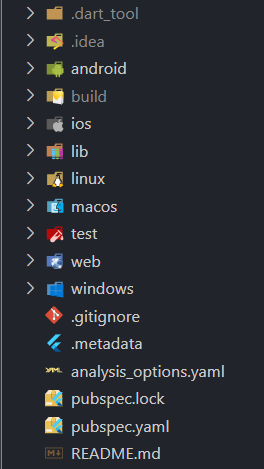
Let's analyze this starting structure folder by folder:
.dart-tool&.ideaare folders used by the editor to improve code suggestions and other things. But they are not important for us;android,ios,linux,macos,webandwindowsare the folders that contain the files necessary to run our application on different OS. You can delete any of this if you don't want the app on that OS.the
buildfolder is created after the first execution of our app and contains files like the APK;libis the main folder of our application, it's the one we're gonna edit and in which we're going to create our files;the
testfolder is similar to the lib folder but is used (as the name says) for creating test routines..gitignoreis the git file that tells Git what file to ignore when publishing the project; (you can find it even in non-Flutter projects).metadatais a file used by IDEs to track the properties of the Flutter project;pubspec.lockis the file where there are contained the default properties/dependencies of our app;pubspec.yamlis the most important file in our app. In this file, we add the packages/dependencies and assets used by our app;README.mdis the readme created by default by the editor;
How to structure a Flutter project
In this part, we'll see how to structure our code (the lib folder).
We're going to follow the method called feature first instead of the layer first which divides the project by features.
In your lib folder, you'll see a main.dart file. You're not going to use the main.dart file to create the app, you'll use it just as a pointer to the home page. But where do I put the home page file?
Well, to organize and set a clean project we can divide different files based on their functions in directories such as models, utils, views, and widgets:
models\: Our models folder should contain the data models of our project such as lists and classes (which are not widgets). For example, in a to-do list app, this folder should contain the files that define the ToDo Item and the ToDo List;utils\: In our utils folder, we should add files that contain the functions/constants used by our app. In the example before, our utils could contain the function to clear the list or add an item;views\/screens\: The views folder is the one that contains the files for the different pages of the app;widgets\: The widgets folder should contain the files for the widgets we use a lot in our app. For example, we create a file containing the code for a card with a specific decoration, so we don't repeat the same decoration over and over in our main file.